
Spent months building Excel tools - only to watch others profit from your VBA code?
Most Excel protection is cheap, easy to crack, and a waste of money. Excel Armor actually protects what you've built. Easy to use, easy on your users, and with optional migration to compiled VB.NET if you want maximum protection.
Or take the 2-minute protection assessment first →
Built for Excel developers who refuse to give their work away.
Excel's built-in protection is a joke. Most cheap third-party "protection" tools mostly resell the same broken tricks. Excel Armor is the one that actually protects what you've spent months building.
Real protection, not snake oil
The cheap stuff (VBA project passwords, "unviewable VBA," and most paid alternatives) gets cracked in seconds with free tools you can find on Google. Excel Armor is a different category. It actually stops attackers.
Easy on you
Click a button on the ribbon. Your file is protected. Ship it. No deep technical setup, no menu mazes.
Easy on your users
Your protected add-in installs the way any normal Excel add-in does. End users don't have to learn anything new, install anything weird, or call IT. Everything just works.
Optional path to VB.NET
Want maximum protection for high-stakes IP? Excel Armor migrates your business logic to compiled VB.NET automatically, and gives you back the readable VB.NET source so you can review, maintain, and stay in full control. If you don't want it, your VBA stays as VBA. Your call.
Universal compatibility
Works with Excel 32-bit and 64-bit, all current versions. One distribution, every customer, no compatibility headaches.
No vendor lock-in
What Excel Armor produces is yours to inspect and audit. No black box, no "trust us," no captive ecosystem. If you ever stop using us, your work is still yours.
Does a VBA project password really protect your work?
Does a VBA project password or the "VBA project unviewable" method truly protect copyrights? Watch the video to discover the truth - and see exactly why we built Excel Armor.
One ribbon. Every protection layer you need.
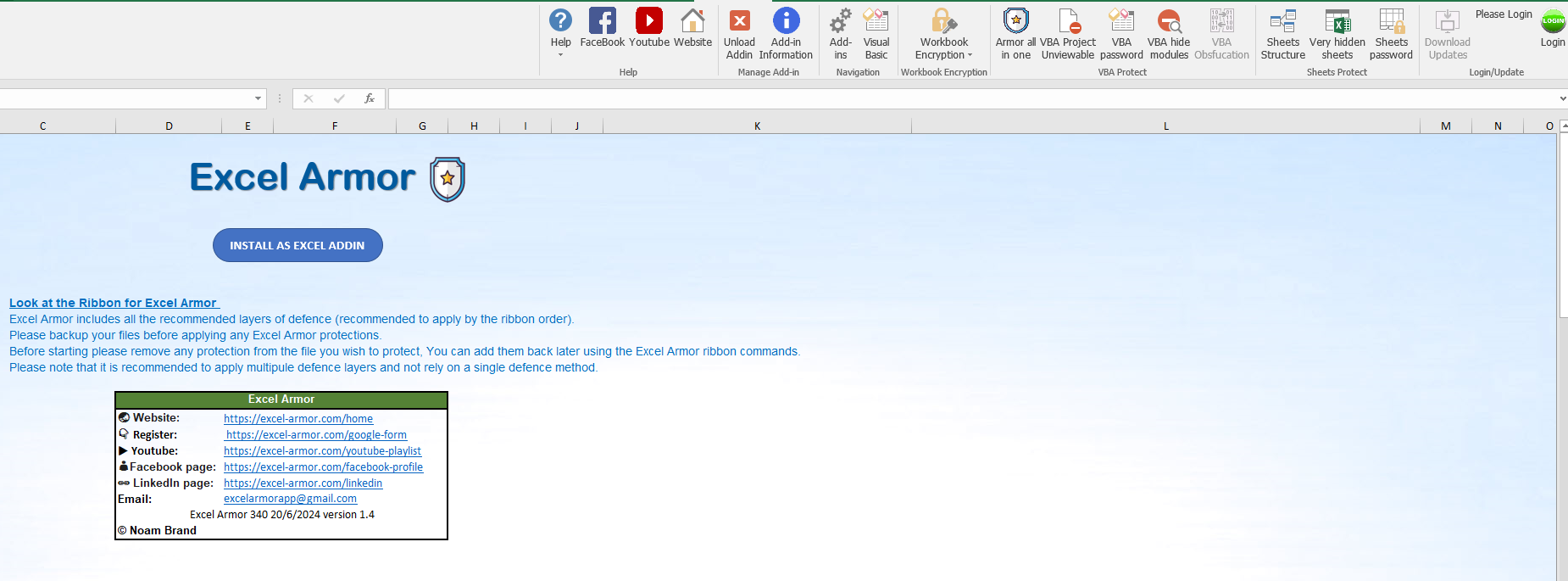
Open the workbook, click Armor All, ship it. Or fire individual buttons for password, encryption, or hide-VBA on their own. The ribbon is the whole UI: no scripts, no installer, no Visual Studio.
Why Excel Armor is in a different category.
Three reasons buyers pick Excel Armor over the cheap, easily-cracked alternatives.
Real protection
The basic VBA password and "unviewable" tricks (which most cheap "protection" products are reselling) get cracked in seconds. Excel Armor is built to stop attackers, not just slow them down for thirty seconds.
Easy to use
Click a button. Your file is protected. Ship it. No new tooling to learn. No half-broken installers your end users have to fight with. Your workflow stays the way you like it.
Optional VB.NET upgrade
For high-stakes IP, Excel Armor migrates your business logic to compiled VB.NET automatically, hardened with an industry-standard .NET obfuscator, and gives you back the readable VB.NET source code that any VB.NET developer can maintain. Maximum protection, automated migration, zero manual rewriting. Take it if you want it; skip it if you don't.
Pick the level of protection you actually need.
Not every add-in needs maximum protection. Excel Armor gives you the choice, and either path is leagues stronger than what cheap competitors sell.
Protect & ship in minutes
Your VBA stays as VBA. Excel Armor wraps it in protection that's stronger than anything the cheap competitors sell. Click, ship, done.
- Best for routine add-ins where IP risk is moderate
- Same workflow you already know
- Fastest path to launch
Migrate the business logic out of VBA
For high-stakes IP that you can't afford to leak. Excel Armor migrates your business logic to compiled VB.NET automatically, hardened with industry-standard .NET obfuscation, and returns the readable VB.NET source code so you stay fully in control. Your UI stays in Excel exactly as users expect.
- Best when the IP value is high and theft would hurt
- Migration is automatic, no manual rewriting
- You get the VB.NET source, readable by any VB.NET developer, fully in your control
- Built-in licensing hooks so you can monetize cleanly

Built by a VBA expert who got tired of watching others get robbed.
I'm Noam Brand, Founder of Excel Armor. VBA expert with a background in Information Systems Management.
I built Excel Armor after testing every built-in and third-party Excel security option and finding them lacking. Most of them are dressed-up versions of tricks that fall over in seconds. I wanted a tool that genuinely defends what Excel developers spend months building, with a workflow they can live with, and a path to maximum protection if their IP justifies it. That's what Excel Armor is.
Connect on LinkedInLock in founding pricing. Forever.
Both products are perpetual licenses with 12 months of updates included. Buy during launch and your renewal pricing is locked in below standard rates for life.
The VB.NET Migration Path
For developers who want maximum protection. Excel Armor migrates your VBA business logic to compiled VB.NET automatically and returns the readable VB.NET source. Your UI stays where it is. Nothing manual, nothing risky.
- Automated migration to compiled VB.NET
- Your VBA UI stays exactly as it is
- You get the VB.NET source, readable by any VB.NET developer, fully in your control
- 12 months of updates included
- Perpetual license, no subscription
The Full Protection Package
Everything in Migrator, plus the full protect-and-monetize pipeline. For high-stakes IP where leakage isn't an option. Ship a hard-to-crack, ready-to-license add-in.
- Everything in Migrator, plus:
- Compiled .NET XLL output with industry-standard obfuscation
- 32-bit & 64-bit XLL builds, ready to sign with your cert
- Built-in licensing so you can monetize cleanly
- 12 months of updates included
- Perpetual license, no subscription
Optional maintenance after year one is ~25% of license price for continued updates. Founding-launch buyers get locked-in renewal pricing forever. Standard prices ($299 / $599) apply once launch closes.
Get the PDF: Microsoft Excel Protection Weaknesses
The technical breakdown of why standard Excel security fails - and what to do instead. Drop your email below and the PDF lands in your inbox the moment you submit - no waiting, no follow-up email. Free, no fluff.
No spam. We'll send the guide instantly. Unsubscribe any time.
Frequently asked questions
No. If you can click a button on the Excel ribbon, you can use Excel Armor. The protection workflow is point-and-click: open the file, click a button on the Armor ribbon, save. The optional VB.NET compile path runs from a single command we give you, after a one-time install of the free build tools.
No, there are no limits to the number of files you can protect.
Not as a free download right now. What you do get is a 14-day refund window: buy it, install it on your add-in, and if it doesn't do what we say, email us within 14 days for a full refund (full terms on the Refund page). The free PDF below explains exactly how the product works, and if you want a proof-of-concept on your specific add-in before you commit, email us first.
Because the cheap ones don't actually protect. The two tricks they're built on (the VBA project password and the "unviewable VBA" technique) can be undone in seconds with free tools you can find on Google. You're paying for the appearance of protection.
Excel Armor is built to actually stop attackers, not just slow them down. And for high-value IP, it offers an optional migration to compiled VB.NET that takes protection to a different level entirely.
Nothing unusual. Your protected add-in installs the same way any Excel add-in does. End users don't have to learn anything new, and they can't see or copy your protected logic. Everything just works.
No, not for now. Excel Armor runs on Microsoft Excel for Windows (32-bit and 64-bit) only. We're focused on validating on Windows before adding any other platforms. Mac is not on the current roadmap.
One-time. Both Migrator and Armor are perpetual licenses with 12 months of updates included. Optional maintenance after year one is around 25% of license price for continued updates. Founding-launch buyers get locked-in renewal pricing forever. See current launch pricing →
No. It's a public trick anyone can undo with a free tool. Most cheap "protection" products are basically reselling it. Excel Armor is built on real protection, not on hiding things in places anyone with Google can find.
Stop shipping crackable VBA.
Migrator converts your business logic. Armor compiles, obfuscates, sets up signing, and adds licensing. Founding launch pricing closes at general release.